Deployment
Nix is designed to run on hardware you control. There are two ways to run it in production, both from the same container images, which CI builds for every commit on main and publishes to the GitHub Container Registry for linux/amd64 and linux/arm64:
Docker Compose on one machine. This is the default target, with a one-command release script that backs up, migrates and smoke-tests.
Kubernetes on a small k3s cluster, with the identity provider and the sites services included. It has to be chosen explicitly.
Start with the architecture, then pick a path.
How the pieces fit#
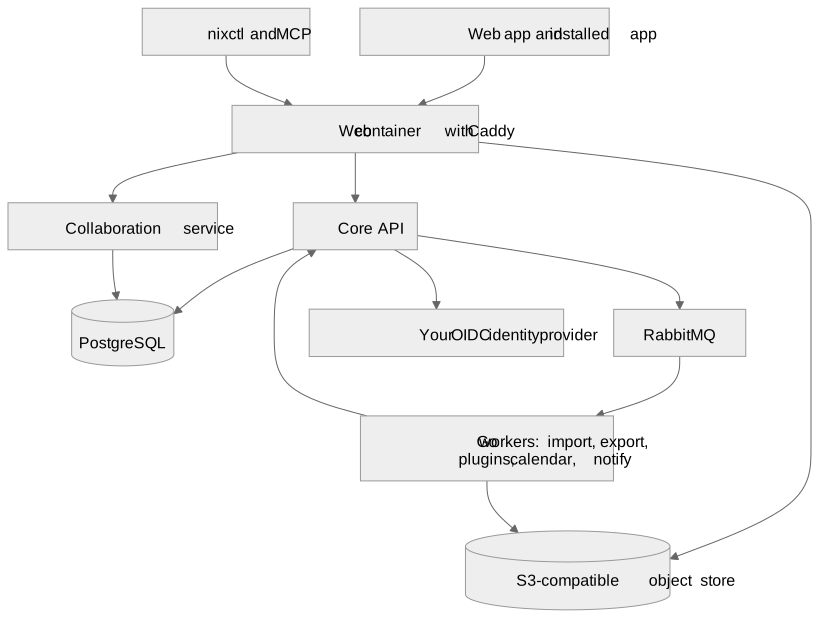
Diagram source
%% diagram
flowchart TB
  Browser[Web app and installed app] --> Edge[Web container with Caddy]
  CLI[nixctl and MCP] --> Edge
  Edge --> Core[Core API]
  Edge --> Collab[Collaboration service]
  Edge --> Store[(S3-compatible object store)]
  Core --> PG[(PostgreSQL)]
  Collab --> PG
  Core --> MQ[RabbitMQ]
  MQ --> Workers[Go workers: import, export, plugins, calendar, notify]
  Workers --> Core
  Workers --> Store
  Core --> IdP[Your OIDC identity provider]
Core (ASP.NET Core) is the only permission authority. It owns items, properties, views, jobs and sign-in.
Collaboration (Node) stores document edits and history, and assembles imports and exports.
Workers (Go) run background jobs. They never hold database credentials; they act through narrow, authorised APIs.
PostgreSQL holds all durable state, with row-level security, and runs full-text search.
The object store holds file bytes. Browsers reach it through short-lived signed links.
Sites, when enabled, adds a build worker and a separate serving process for published websites.
In this section
Architecture and services
A Nix deployment is a handful of small services around one PostgreSQL database. Each has one job, and only Core decides...
Choosing a path
Both paths run the same images and the same database schema. They differ in what they include, how they are operated...
Requirements
Linux on amd64 or arm64. Docker Engine with Compose v2 that supports docker compose up --wait. Git, to check out the...
Docker Compose
The production manifest is deploy/compose.prod.yml in the repository. Images come from...
Kubernetes
The manifests in deploy/k8s/ run a complete Nix deployment on a k3s cluster: the application, its database, broker...
Images and tags
CI builds Nix's images in .github/workflows/ci-images.yml on every push to main, and on demand. Image Contents api Core...
Configuration
With Docker Compose, all production settings live in one private environment file, based on...
Backups
A Nix backup is only complete if it contains the database, the file bytes and the keys needed to use them. A database...
Upgrades
Every commit on main gets a full set of images, tagged with its full 40-character commit SHA, for linux/amd64 and...